Merisio
A modern MERISE database modeling tool built with Python and PySide6.
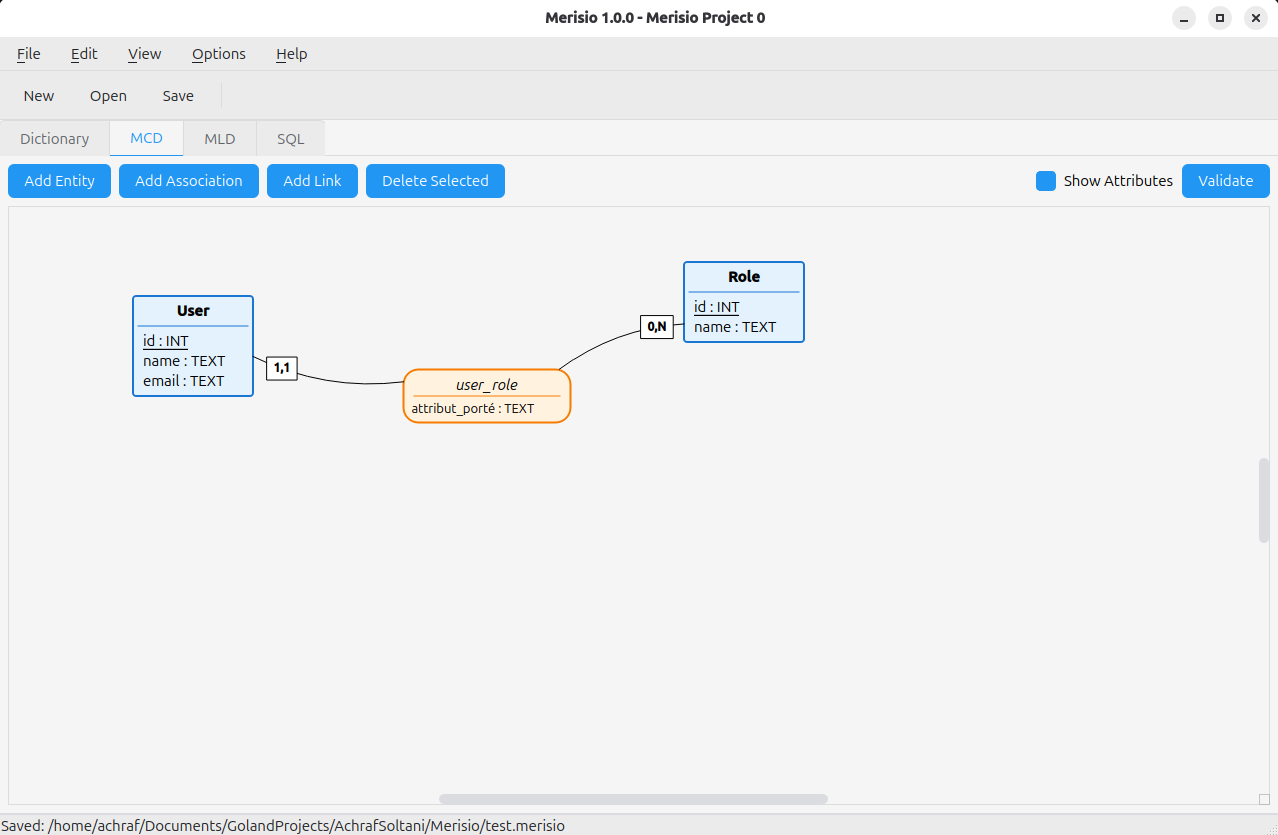
Create MCD (Conceptual Data Model) diagrams, automatically generate MLD (Logical Data Model) views, and export PostgreSQL SQL scripts — from the GUI or the command line.
Download
Available formats:
- Linux:
.tar.gz(portable) or.deb(Debian/Ubuntu) - Windows:
.zip(portable)
All packages include both the GUI application (merisio) and the CLI tool (merisio-cli).
Features
MCD Editor
- Visual diagram editor for entities, associations, and links
- MySQL Workbench-inspired layout: collapsible sidebar (minimap, project tree, properties panel) + central canvas + bottom output panel
- Drag-and-drop positioning, multi-selection, rubber-band selection
- Cardinalities: (0,1), (0,N), (1,1), (1,N) with inline editing
- Link styles: Curved (Catmull-Rom smoothed), Orthogonal (L-routing), Straight
- Toggle attribute visibility, customisable diagram colours
- Zoom controls (25%–400%)
- Export diagrams to SVG, PNG, or PDF
--helpand--versionflags
Editing Relation Links (v1.6.0)
- Draggable waypoints — select a link to reveal handles; drag bend points to reshape, drag a segment midpoint to insert a new bend
- Magnetic snap during drag (20 scene units), with orthogonal segment-axis-lock when the segment is clearly horizontal or vertical
- Tidy Up Link — collapse near-collinear waypoints in one click (40-unit threshold, iterates until stable)
- Straighten Link — wipe all waypoints; the link reverts to its auto-routed shape
- Draggable cardinality label — slide the “1,N” / “0,1” box along the link’s path; position survives save/reload
- Smooth Catmull-Rom curves through every waypoint (C¹ continuity), centroid-aware bend direction so curves bow outward
Undo / Redo (v1.6.0)
- Snapshot-based history of every modification (drag, edit, waypoint, label, colours, link style)
Ctrl+Zto undo,Ctrl+Shift+Zto redo- 100-entry bounded stack; opening or creating a project re-seeds history
CLI Tool (merisio-cli)
- Validate MCD models in CI pipelines
- Generate PostgreSQL DDL to stdout or file
- Inspect MLD tables and columns
- Export diagrams headlessly (PNG, SVG, PDF)
- Full
--helpand--versionsupport
Data Dictionary
- Overview of all attributes across entities
- Define data types: INT, VARCHAR, TEXT, DATE, BOOLEAN, etc.
MLD View
- Automatic Logical Data Model generation from MCD
- Editable column names (rename auto-generated foreign keys)
- Custom names saved in project
SQL Generation
- PostgreSQL CREATE TABLE statements
- Automatic primary/foreign key generation
- Ready to execute scripts
Project Management
- Save/load projects in
.merisioJSON format - Cross-platform compatibility
Installation
Linux (Debian/Ubuntu)
sudo dpkg -i merisio_1.6.0_amd64.deb
This installs both /usr/bin/merisio (GUI) and /usr/bin/merisio-cli (CLI).
Linux (Portable)
tar -xzvf Merisio-linux-x64.tar.gz
cd Merisio-linux-x64
./Merisio        # GUI
./merisio-cli    # CLI
Windows
Extract Merisio-windows-x64.zip and run Merisio.exe (GUI) or merisio-cli.exe (CLI).
From Source
git clone https://github.com/AchrafSoltani/Merisio.git
cd Merisio
./run.sh                            # creates .venv on first run, then launches the GUI
run.sh forwards any arguments to main.py. For the CLI, use .venv/bin/python cli.py <args> after the first launch, or set up the venv manually:
python3 -m venv .venv
source .venv/bin/activate
pip install -r requirements.txt
python main.py       # GUI
python cli.py        # CLI
CLI Usage
merisio-cli <file.merisio> <command> [options]
| Command | Description |
|---|---|
info |
Show project metadata and statistics |
validate |
Validate the MCD model (exit code 1 on errors) |
sql |
Generate PostgreSQL DDL |
mld |
Show the logical data model |
export |
Export diagram to PNG, SVG, or PDF |
Examples
# Project info
merisio-cli project.merisio info

# Validate (useful in CI — fails with exit code 1)
merisio-cli project.merisio validate

# Generate SQL
merisio-cli project.merisio sql
merisio-cli project.merisio sql -o schema.sql

# View MLD tables
merisio-cli project.merisio mld

# Export diagram
merisio-cli project.merisio export --format png -o diagram.png
merisio-cli project.merisio export --format svg -o diagram.svg
merisio-cli project.merisio export --format pdf -o diagram.pdf
merisio-cli project.merisio export --format png -o diagram.png --scale 3.0
Keyboard Shortcuts
| Shortcut | Action |
|---|---|
| Ctrl+N | New Project |
| Ctrl+O | Open Project |
| Ctrl+S | Save Project |
| Ctrl+Shift+S | Save As |
| Ctrl+Z | Undo |
| Ctrl+Shift+Z | Redo |
| Ctrl+B | Toggle Sidebar |
| Ctrl+J | Toggle Output Panel |
| Ctrl+1 | MCD Tab |
| Ctrl+2 | MLD Tab |
| F5 | Validate Model |
| Delete | Delete Selected |
| Ctrl+Scroll | Zoom In/Out |
| Ctrl++ | Zoom In |
| Ctrl+- | Zoom Out |
| Ctrl+0 | Fit to View |
| Ctrl+Shift+0 | Reset Zoom (100%) |
Help & Version
Both binaries support --help and --version:
merisio --help          # Print usage and exit
merisio --version       # Print version and exit
merisio-cli --help      # Print CLI usage and exit
merisio-cli --version   # Print CLI version and exit
Man Pages
Man pages are provided for both merisio(1) and merisio-cli(1).
# Install system-wide (requires root)
sudo python build.py install-man
man merisio
man merisio-cli

# Or read directly from source
man ./man/merisio.1
man ./man/merisio-cli.1
About MERISE
MERISE is a French methodology for database design, widely used in France and French-speaking countries. It uses:
- MCD (Modèle Conceptuel de Données) - Conceptual Data Model with entities and associations
- MLD (Modèle Logique de Données) - Logical Data Model with tables and relationships
- MPD (Modèle Physique de Données) - Physical Data Model (SQL implementation)
Merisio helps you design at the conceptual level and automatically generates the logical and physical models.
License
GNU GPL v2
Author
Achraf SOLTANI
- Email: achraf.soltani@pm.me
- GitHub: @AchrafSoltani
Acknowledgments
Inspired by the original AnalyseSI Java project.